I came across this recently and given that you get both sides of the story (well at least almost) its not a bad way of considering the two big options for iPhone development.
Dom

I came across this recently and given that you get both sides of the story (well at least almost) its not a bad way of considering the two big options for iPhone development.
Dom
Some big big news on the iPhone developer front particularly for the multi-class (Dungeons and Dragon reference) iPhone/.Net Developers.
http://www.apple.com/pr/library/2010/09/09statement.html
Specifically:
“In particular, we are relaxing all restrictions on the development tools used to create iOS apps, as long as the resulting apps do not download any code. This should give developers the flexibility they want, while preserving the security we need.“
I’ll keep you up to date from any statements from the Monotouch mailing lists. For a lot of .Net devs, who have been in a holding pattern over Monotouch for around 9 months, they are probably doing a little dance. There had previously been some uncertainty on the legitimacy of using Monotouch to deploy to the iTunes store!!!!!
Dom
Geoff Lamarche is author of the great introductory book (Begnning iPhone development) for the iphone developer – here is the blog for the man: http://iphonedevelopment.blogspot.com/
Dom

Which way to the battle? – The Introduction
This tutorial is a short introduction to iPhone development. Like most of my tutorials it’s based on a game.
This is the second in a series of tutorials. The first tutorial was a TDD tutorial in C# 4.0.
This version of the tutorial is similar in functionality to the C# version with obvious changes to the UI as needed. I am not using a TDD approach, mainly because I am not really up to TDD on the iPhone yet.
By completing this tutorial you will:
CannonAttack iPhone is a simple game where a player enters an angle and velocity of a cannonball to hit a target at a given distance. The game uses a basic formula for calculating the trajectory of the cannonball and the player keeps taking turns at shooting at the target until it has been hit
Where are the cannonballs – What you need:
I built this with the following tools:
Whilst this is a pretty basic introduction to iPhone development, it assumes a very basic knowledge of iPhone development and while it doesn’t spell out every single step, you should have more than enough detail to complete it.
The battleplan – The CannonAttack Requirements/Specs:
The following is a combination of Requirements and Specifications that will give us some guide in terms of the application we are trying to build:
distance = velocity * Math.Cos(angleInRadians) * time;
height = (velocity * Math.Sin(angleInRadians) * time) – (GRAVITY * Math.Pow(time, 2)) / 2;
Building the Cannon – Creating the Cannon UI
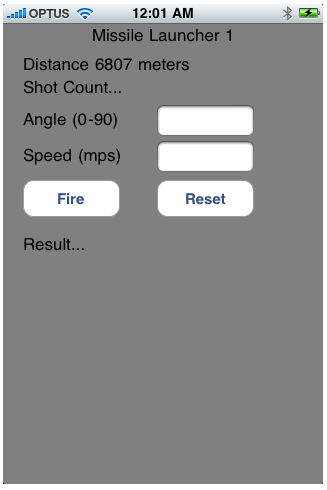
#import <UIKit/UIKit.h>
@interface CannonLauncher1ViewController : UIViewController {
IBOutlet UILabel *descriptionLabel;
IBOutlet UILabel *resultLabel;
IBOutlet UITextField *speedTextField;
IBOutlet UITextField *angleTextField;
IBOutlet UILabel *shotCountLabel;
int targetDistance;
int shotCount;
}
//Properties
@property (nonatomic,retain) UILabel *descriptionLabel;
@property (nonatomic,retain) UILabel *resultLabel;
@property (nonatomic,retain) UITextField *speedTextField;
@property (nonatomic,retain) UITextField *angleTextField;
@property (nonatomic,retain) UILabel *shotCountLabel;
//Actions
-(IBAction)fireButton:(id)sender;
-(IBAction)resetButton:(id)sender;
-(IBAction)backgroundClick:(id)sender;
//Methods
-(void)hideNumberKeyboard;
-(void)resetTextBoxes;
@end
So now add the following code to the .m file
#import "CannonLauncher1ViewController.h"
#import "Cannon.h"
@implementation CannonLauncher1ViewController
@synthesize descriptionLabel;
@synthesize resultLabel;
@synthesize speedTextField;
@synthesize angleTextField;
@synthesize shotCountLabel;
- (void)viewDidLoad {
[super viewDidLoad];
[self resetTextBoxes];
}
//Button handler for the fire button
-(IBAction) fireButton:(id) sender
{
NSInteger velocity = [[speedTextField text]intValue];
NSInteger angle = [[angleTextField text]intValue];
Cannon *cannon = [[Cannon alloc]init];
cannon.targetDistance = targetDistance;
[cannon Shoot:angle Speed:velocity];
shotCount ++;
resultLabel.text = cannon.message;
shotCountLabel.text =
[NSString stringWithFormat: @"Shot Count %d", shotCount];
[self hideNumberKeyboard];
[cannon release];
}
//Button handler for the reset button
-(IBAction) resetButton:(id) sender
{
[self resetTextBoxes];
}
//Button Handler for the main backgtound button
-(IBAction)backgroundClick:(id)sender
{
[self hideNumberKeyboard];
}
//Hides the number keyboard
-(void)hideNumberKeyboard
{
[speedTextField resignFirstResponder];
[angleTextField resignFirstResponder];
}
//Reset the distance and set it as rge text of the description label
-(void)resetTextBoxes
{
targetDistance = rand() %10000;
NSString *distanceText = [[NSString alloc] initWithFormat: @"Distance %d meters (50m",targetDistance];
descriptionLabel.text = distanceText;
speedTextField.text = @"";
angleTextField.text = @"";
shotCount = 0;
[distanceText release];
}
//Built in Method I didn't change this
- (void)didReceiveMemoryWarning {
// Releases the view if it doesn't have a superview.
[super didReceiveMemoryWarning];
}
//Built in Method to clean up any objects
- (void)dealloc {
[descriptionLabel release];
[resultLabel release];
[speedTextField release];
[angleTextField release];
[shotCountLabel release];
[super dealloc];
}
@end
OK so all we have to do now is implement the cannon class.
Now edit the cannon.h file and replace the code with this header code:
//
// Cannon.h
// CannonLauncher1
//
// Created by Dom Millar on 16/06/10.
// Copyright 2010 __MyCompanyName__. All rights reserved.
#import <Foundation/Foundation.h>
@interface Cannon : NSObject {
@private int targetDistance;
NSString *message;
}
@property (readwrite,assign)int targetDistance;
@property (nonatomic,retain) NSString *message
-(IBAction) Shoot: (int) angle Speed: (int) speed;
@end
Now all we have to do is add the code for cannon.m
//
// Cannon.m
// CannonLauncher1
//
// Created by Dom Millar on 16/06/10.
// Copyright 2010 __MyCompanyName__. All rights reserved.
//
#import "Cannon.h"
@implementation Cannon
@synthesize targetDistance;
@synthesize message;
-(IBAction) Shoot: (NSInteger) angle Speed: (NSInteger) velocity
{
//set up the local variables for the shoot method
float time = 0;
float height = 0;
float distance = 0;
float gravity = 9.80665;
float variation = 50;
float pi = 3.1415926536;
//Keep calculating height and distance untill height < 0
while(height >= 0)
{
float angleInRadians = ( pi / 180 ) * angle;
distance = velocity * cos(angleInRadians) * time;
height = (velocity * sin(angleInRadians)) - (gravity * pow(time,2));
time++;
}
//Complete calculation
if ((targetDistance >= distance-variation) && (targetDistance <= distance+variation))
{
//Display the hit
message = @"Hit";
}
else
{
//Display the Miss
NSString *description = [NSString stringWithFormat:@"Missed target landed at %f meters" , distance];
message = description;
//[description release];
}
}
@end
Now make sure everything builds. Go back interface builder and you need to do setup the following outlets and actions:
This shows you all the hooks we need:
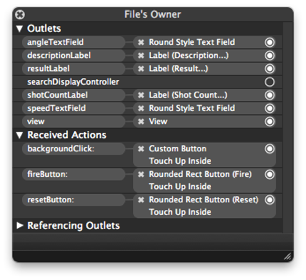
OK now You should be ready to run, go back to XCode and run the app and you should be able to play the game like:
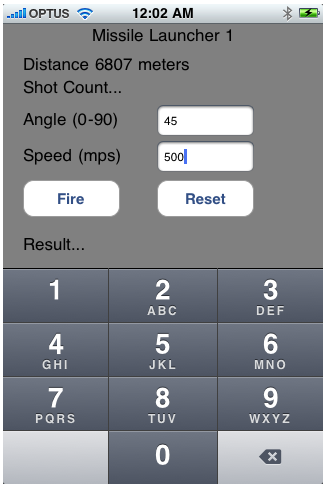
You can see the Keyboard is visible here – once we click on a button or the main screen the keyboard will disappear:
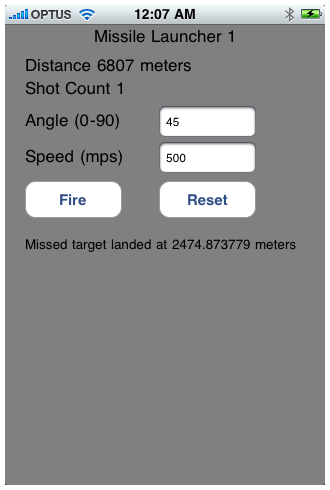
Victory Condition – In summary
So that’s it – our latest version of the Cannon Attack game is complete. There are lots of changes you can make to make the game more interesting so play around with the project as much as you like.
Happy Coding – Dom.
Introduction:
This is a short guide to resolving the issue of the expired certificate using XCode with the iPhone SDK – its probably relevant for setting up your certificate from scratch as well. I am not totally convinced this is the best way of fixing the expired certificates for iPhone Development, but it worked for me so.
The Environment:
The development environment is a follows:
The Problem:
You’ll may get a variety of messages when the certificate expires and they will include:
a valid signing identity matching this profile could not be found in your keychain
or :
code sign error: the identiy matching this profile could not be found in your keychain
or
You currently do not have a valid certificate
Getting a new certificate:
Dom
Not a free resource but given that its almost 3 weeks of training I think $800 is pretty cheap:
Dom
Often when you read blogs or articles on improving .NET development skills you’ll find a recurring theme : learn another language or learn a new technology. For the C# .Net developers that usually means looking at languages like VB, Ruby, Java, PHP, Pytho. In terms of technologies it involves looking at one of the myriad of .Net technologies like MVC, Silverlight, Entity Framework, WPF, AJAX, jQuery,Windows Mobile etc… etc…
So the main reason this is a recurring theme, is because as a developer by learning new language you are taking yourself outside your comfort zone and exposing yourself to a new syntax, techniques, tools and frameworks. Whilst this can be daunting at times or may even seem slightly pointless (ie. If you are a great VB.NET developer in a great VB.NET job why would waste your time changing), you need to consider the potential benefits in applying yourself to a new language.
Now iPhone development is not the most logical move for .Net developers. Historically, there is a fair bit of tension and antagonism between the Apple and the Microsoft camps. Suggesting there is a logical reason to combine the development skillsets of the two big competitors may not seem that sensible. However, from a .Net developers perspective I feel there is a significant case to add the iPhone SDK to your skillset including:
Next Part 3 – Ok I want to do some iPhone Development what do I need?
Dom
This is the first in a series of short blogs (you’ll get the idea soon that I really don’t like big blogposts – except for tutorials of course) that I am writing on the merits of combining the two development technologies: .Net and iPhone. I am going to focus on why a .NET developer would seriously consider adding the iPhone SDK to his/her skillset.
So to get the fundamentals out of the way lets just outline what each means:
1. .Net Development
Developing applications on windows based PC’s for either generally Microsoft Operating Systems (including microsoft handheld/tablet devices) and/or for the web. The primary tool is Visual Studio using the C# or VB.Net language.
2. iPhone Development
Developing applications on Macintosh computers for the iPhone (and iPad) using XCode (with Objective C) and Interface Builder.
I’ll also set the scene here so that you understand my perspective – I have been writing .NET applications for a living for many years, and have been playing around with the iPhone development environment in some of my spare time at home over the last year or so but haven’t made major advances – YET!!!!.
The reality with these posts is that they are from the perspective of a .Net developer trying to build both my .Net and iPhone skills at the same time, so take that into account when you read future posts.
Next : Adding another string to the bow
Dom
Just to let you know that my website displays well to mobile devices. This is a feature of the wordpress blogging (www.wordpress.com) engine and is provided by default. It renders really well on the iPhone.
Dom
 Doms Code