As usual the champions at c-sharp corner have edited it and code formatting is much prettier than my efforts so have a look if you are keen
Dom

As usual the champions at c-sharp corner have edited it and code formatting is much prettier than my efforts so have a look if you are keen
Dom
I have mentioned this in passing on the blog, but never really pointed out what a great resource and read this series is. Highly recommended for anyone interested in C# roguelike development and Point of View theories.
http://blogs.msdn.com/b/ericlippert/archive/2011/12/12/shadowcasting-in-c-part-one.aspx
Dom
Really Really Really Simple Roguelike V0.1
Want to build a Roguelike with C# in 5 minutes? The following is a really quick game I built in about 2 hours and shows how easy it is to get a simple game going.
Its a very very very simple game – all you do is pickup a sword before the monster gets to you and you win. Obviously, if the monster gets to you first – well you can work out the ending.
What do you need?
C# on Visual Studio 2005/2008 or 2010. Any version should be fine as long as you can create a console application.
Now we are going to add the following into 1 file in Visual Studio rather than using multiple files and whilst this is not the best practice for a serious application,
we are doing this to keep things really simple, and to display the entire application on a few pages of paper.
Here we go
1.Start Visual Studio 2010
2.File->New Project
3.Select the Windows->Console Application
4.Name the Project ReallyReallyRealySimpleRogueLike and click OK
5.Right click on References->Add Reference…
6.Click on Assemblies then Framework and select System.Drawing
7.At the top of Program.cs insert the following line using System.Drawing;
8.Replace the program class with the following
 class ReallyReallyReallySimpleRogueLike
    {
        static void Main(string[] args)
        {
            Dungeon dungeon = new Dungeon(Constants.DungeonWidth, Constants.DungeonHeight);
            string displayText = Constants.IntroductionText;

            while (dungeon.IsGameActive)
            {
                dungeon.DrawToConsole();
                Console.WriteLine(displayText);
                Console.Write(Constants.CursorImage);
                displayText = dungeon.ExecuteCommand(Console.ReadKey());
            }

            Console.WriteLine(ConcludeGame(dungeon));
            Console.ReadLine();
        }

        private static string ConcludeGame(Dungeon dungeon)
        {
            return (dungeon.player.Hits > 0) ? Constants.PlayerWinsText : Constants.MonsterWinsText;
        }
    }
9.Now add the following class
 class Dungeon
    {
        Random r;
        public Player player;
        List monsters;
        List swords;
        List walls;

        public Tile[,] Tiles;
        private int xMax;
        private int yMax;
        public enum Direction
        {
            North,
            South,
            East,
            West
        }

        public bool IsGameActive
        {
            get
            {
                return (player.Hits > 0 && monsters.Any(m => m.Hits > 0));
            }
        }

        public Dungeon(int xMax, int yMax)
        {
            monsters = new List();
            walls = new List();
            swords = new List();

            this.xMax = xMax;
            this.yMax = yMax;
            Tiles = new Tile[xMax, yMax];
            BuildRandomDungeon();
            SetDungeonTiles();
        }

        public string ExecuteCommand(ConsoleKeyInfo command)
        {
            string commandResult = ProcessCommand(command);
            ProcessMonsters();
            SetDungeonTiles();

            return commandResult;
        }

        private void ProcessMonsters()
        {
            if (monsters != null && monsters.Count > 0)
            {
                monsters.Where(m => m.Hits >= 0).ToList().ForEach(m =>
                {
                    MoveMonsterToPlayer(m);
                });
            }
        }

        private void BuildRandomDungeon()
        {
            r = new Random();
            SetAllDungeonSquaresToTiles();

            for (int i = 0; i < xMax; i++)
            {
                Wall top = new Wall(i, 0);
                walls.Add(top);
                Wall bottom = new Wall(i, yMax - 1);
                walls.Add(bottom);
            }

            for (int i = 0; i < yMax; i++)
            {
                Wall left = new Wall(0, i);
                walls.Add(left);
                Wall right = new Wall(xMax - 1, i);
                walls.Add(right);
            }

            for (int i = 0; i < Constants.NumberOfSwords; i++)
            {
                Sword s = new Sword(GetValidRandomPoint());
                swords.Add(s);
            }

            for (int i = 0; i  0 && monster.X  player.X) ? -1 : 1;

            if ((monster.Y > 0 && monster.Y  player.Y) ? -1 : 1;

            if (!IsInvalidValidMove(move.X, move.Y))
            {
                monster.X = move.X;
                monster.Y = move.Y;
            }

            if (monster.X == player.X && monster.Y == player.Y)
                ResolveCombat(monster);
        }

        private void ResolveCombat(Monster monster)
        {
            if (player.Inventory.Any())
                monster.Die();
            else
                player.Die();
        }

        public string ProcessCommand(ConsoleKeyInfo command)
        {

            string output = string.Empty;
            switch(command.Key)
            {
                case ConsoleKey.UpArrow:
                case ConsoleKey.DownArrow:
                case ConsoleKey.RightArrow:
                case ConsoleKey.LeftArrow:
                    output = GetNewLocation(command, new Point(player.X, player.Y));
                    break;
                case ConsoleKey.F1:
                    output = Constants.NoHelpText;
                    break;
            }

            return output;
        }

        private string GetNewLocation(ConsoleKeyInfo command, Point move)
        {
            switch (command.Key)
            {
                case ConsoleKey.UpArrow:
                    move.Y -= 1;
                    break;
                case ConsoleKey.DownArrow:
                    move.Y += 1;
                    break;
                case ConsoleKey.RightArrow:
                    move.X += 1;
                    break;
                case ConsoleKey.LeftArrow:
                    move.X -= 1;
                    break;
            }

            if (!IsInvalidValidMove(move.X, move.Y))
            {
                player.X = move.X;
                player.Y = move.Y;
                if (Tiles[move.X, move.Y] is Sword && player.Inventory.Count == 0)
                {
                    Sword sword = (Sword)Tiles[move.X, move.Y];
                    player.Inventory.Add(sword);
                    swords.Remove(sword);
                }
                return Constants.OKCommandText;
            }
            else
                return Constants.InvalidMoveText;
        }

        public bool IsInvalidValidMove(int x, int y)
        {
            return (x == 0 || x == Constants.DungeonWidth - 1 || y == Constants.DungeonHeight - 1 || y == 0);
        }

        public void SetDungeonTiles()
        {
            //Draw the empty dungeon
            SetAllDungeonSquaresToTiles();

            SetAllDungeonObjectsToTiles();
        }

        private void SetAllDungeonObjectsToTiles()
        {
            //Now draw each of the parts of the dungeon
            walls.ForEach(w => Tiles[w.X, w.Y] = w);
            swords.ForEach(s => Tiles[s.X, s.Y] = s);
            monsters.ForEach(m => Tiles[m.X, m.Y] = m);
            Tiles[player.X, player.Y] = player;
        }

        private void SetAllDungeonSquaresToTiles()
        {
            for (int i = 0; i < yMax; i++)
            {
                for (int j = 0; j < xMax; j++)
                {
                    Tiles[j, i] = new Tile(i, j);
                }
            }
        }

        public void DrawToConsole()
        {
            Console.Clear();
            for (int i = 0; i < yMax; i++)
            {
                for (int j = 0; j < xMax; j++)
                {
                    Console.ForegroundColor = Tiles[j, i].Color;
                    Console.Write(Tiles[j, i].ImageCharacter);
                }
                Console.WriteLine();
            }
        }
    }
10.Now underneath add the following code for the Tile,Wall and Sword classes
public class Tile
    {
        public string name { get; set; }
        public string ImageCharacter { get; set; }
        public ConsoleColor Color { get; set; }
        public int X { get; set; }
        public int Y { get; set; }

        public Tile() { }

        public Tile(int x, int y)
            : base()
        {
            this.X = x;
            this.Y = y;
            ImageCharacter = Constants.TileImage;
            Color = Constants.TileColor;
        }
    }

    public class Wall : Tile
    {
        public Wall(int x, int y)
            : base(x, y)
        {
            ImageCharacter = Constants.WallImage;
            this.Color = Constants.WallColor;
        }
    }

    public class Sword : Tile
    {
        public Sword(Point p)
        {
            ImageCharacter = Constants.SwordImage;
            this.Color = Constants.SwordColor;
            X = p.X;
            Y = p.Y;
        }
    }
11.Now add the classes you need for the various creatures
 public class Creature : Tile
    {
        public int Hits { get; set; }

        public void Die()
        {
            Hits = 0;
        }
    }

    public class Player : Creature
    {
        public Player(Point p)
        {
            ImageCharacter = Constants.PlayerImage;
            Color = Constants.PlayerColor;
            Inventory = new List();
            X = p.X;
            Y = p.Y;
            Hits = Constants.StartingHitPoints;
        }

        public List Inventory { get; set; }
    }

    public class Monster : Creature
    {
        public Monster(Point p)
        {
            ImageCharacter = Constants.MonsterImage;
            Color = Constants.MonsterColor;
            X = p.X;
            Y = p.Y;
            Hits = Constants.StartingHitPoints;
        }
    }
12.Now add the following class for all our constants
 public static class Constants
    {
        public readonly static int DungeonHeight = 20;
        public readonly static int DungeonWidth = 20;
        public readonly static int NumberOfSwords = 5;
        public readonly static int MonsterDamage = 2;
        public readonly static int NumberOfMonsters = 1;
        public readonly static int StartingHitPoints = 10;

        public readonly static string TileImage = ".";
        public readonly static string WallImage = "#";
        public readonly static string PlayerImage = "@";
        public readonly static string SwordImage = "s";
        public readonly static string StepsImage = "S";
        public readonly static string MonsterImage = "M";
        public readonly static string CursorImage = ">";

        public readonly static ConsoleColor MonsterColor = ConsoleColor.Blue;
        public readonly static ConsoleColor PlayerColor = ConsoleColor.Gray;
        public readonly static ConsoleColor WallColor = ConsoleColor.DarkCyan;
        public readonly static ConsoleColor SwordColor = ConsoleColor.Yellow;
        public readonly static ConsoleColor TileColor = ConsoleColor.White;

        public readonly static string InvalidCommandText = "That is not a valid command";
        public readonly static string OKCommandText = "OK";
        public readonly static string InvalidMoveText = "That is not a valid move";
        public readonly static string IntroductionText = "Welcome to the dungeon - grab a sword kill the monster(s) win the game";
        public readonly static string PlayerWinsText = "Player kills monster and wins";
        public readonly static string MonsterWinsText = "Monster kills player and wins";
        public readonly static string NoHelpText = "No help text";
    }
13. Compile and Run this and you should see something like:
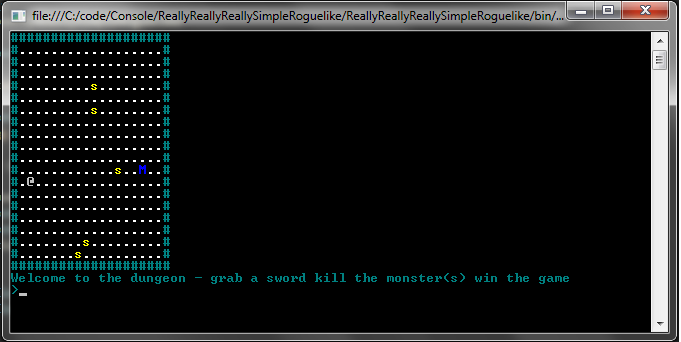
Screenshot of ReallyReallyReallySimpleRougueLike
Next Time
Next time I will present the first iteration of the program and we’ll see some nice improvements.
Ok I am building a really really really simple Roguelike in C# to show how easy it is to do and also to show how C# is such a cool language to build RogueLikes. More details soon but here is a a really exciting screenshot…
Screenshot of ReallyReallyReallySimpleRougueLike
We are going to see a lot more articles and tutorials from me on roguelike games this year and part of the reason for this is the importance for these type of games for the beginner/intermediate developer. Whilst it’s obviously hard to build any sort of 3d game for a beginner developerwithout assistance – building a simple yet playable roguelike game however (even just using a windows console app say using C#) is quite possible. OK you are not going to make a fortune out of a simple textbased rouguelike ,but you may well be able to get your friends to play it!!!
Some cool links for roguelikes:
http://roguelikeradio.blogspot.com/
http://roguelikedeveloper.blogspot.com/
http://blogs.msdn.com/b/ericlippert/archive/2011/12/12/shadowcasting-in-c-part-one.aspx
Dom
 Doms Code