http://rrrsroguelike.codeplex.com/
Its all pretty simple at the moment – looking to add some cool things soon though
Dom

http://rrrsroguelike.codeplex.com/
Its all pretty simple at the moment – looking to add some cool things soon though
Dom
Whats all the fuss about Rouguelike games?
If you haven’t heard about Roguelike games – it is time you get started. Roguelike’s are best summed up by Wikipedia:
“The roguelike is a sub-genre of role-playing video games, characterized by randomization for replayability, permanent death, and turn-based movement. Most roguelikes feature ASCII graphics, with newer ones increasingly offering tile-based graphics. Games are typically dungeon crawls, with many monsters, items, and environmental features. Computer roguelikes usually employ the majority of the keyboard to facilitate interaction with items and the environment. The name of the genre comes from the 1980 game Rogue.”
Wikipedia 2012
Its a strong Indie game development movement that is growing at a significant rate and has attracted enoormous interest from a lot of gamers who are slightly over the overflow of First Player Shooter (FPS) games going around.
Why would I use C# to build a roguelike
Although maybe not the most obvious choice for general game development – C# is well suited to a good old school roguelike because it is such a simple and brilliant language. The following are the big reasons I think that make it a great choice for developing a roguelike game. You can find more information on the use of C# for roguelike development at http://www.domscode.com
LINQ
Without a doubt the power of LINQ minimises a lot of code and keeps your code really quite neat. Think about a simple Object model like:
DUNGEON -> LEVELS -> ROOMS -> ITEMS
So this says that a dungeon can have multiple levels, and each level can have multiple rooms and each room can have multiple items. Now if for some reason we wanted to determine the number of items in a given level (lets say we have currentLevel) we could do something like:
 var countItemsOnEachLevel = from l in dungeon.Levels
                                        from r in l.Rooms
                                        from i in r.Items
                                        select i;
            Console.WriteLine("Items on each level {0}",
            countItemsOnEachLevel.Count());
Or lets say we have
DUNGEON -> LEVELS -> MONSTERS
So again this means our dungeon can multiple levels and each level can have multiple monsters. Now if we need to work out the number of monsters alive on each level
var countMonstersAliveOnEachLevel = from l in dungeon.Levels
                                                from m in l.Monsters
                                                where m.HitPoints > 0
                                                select m;
            Console.WriteLine("Monsters alive on each level {0}",
            countMonstersAliveOnEachLevel.Count());
Full OO support
The use of Inheritance, Encapsulation and polymorphism is quite critical to building a good roguelike object model.
Great Community Support
There are so many great sites to get support on C# development and the shear size of the development community means that you don’t have to go far to get answers to questions or advice on C# dev issues. C-sharpcorner,stackoverflow,msdn are just a few great sites to get assistance.
Free Dev Tools
VS2010 express is fine to build a roguelike and of course its free.
Want to know more about Rogelikes
There are lots of places to find more information but a couple of great places to start are:
http://roguebasin.roguelikedevelopment.org/index.php/Main_Page
http://www.roguetemple.com/
http://roguelikeradio.blogspot.com.au/ (This is quite brilliant!!!)
Happy coding and adventuring
Dom
As usual the champions at c-sharp corner have edited it and code formatting is much prettier than my efforts so have a look if you are keen
Dom
I have mentioned this in passing on the blog, but never really pointed out what a great resource and read this series is. Highly recommended for anyone interested in C# roguelike development and Point of View theories.
http://blogs.msdn.com/b/ericlippert/archive/2011/12/12/shadowcasting-in-c-part-one.aspx
Dom
Really Really Really Simple Roguelike V0.1
Want to build a Roguelike with C# in 5 minutes? The following is a really quick game I built in about 2 hours and shows how easy it is to get a simple game going.
Its a very very very simple game – all you do is pickup a sword before the monster gets to you and you win. Obviously, if the monster gets to you first – well you can work out the ending.
What do you need?
C# on Visual Studio 2005/2008 or 2010. Any version should be fine as long as you can create a console application.
Now we are going to add the following into 1 file in Visual Studio rather than using multiple files and whilst this is not the best practice for a serious application,
we are doing this to keep things really simple, and to display the entire application on a few pages of paper.
Here we go
1.Start Visual Studio 2010
2.File->New Project
3.Select the Windows->Console Application
4.Name the Project ReallyReallyRealySimpleRogueLike and click OK
5.Right click on References->Add Reference…
6.Click on Assemblies then Framework and select System.Drawing
7.At the top of Program.cs insert the following line using System.Drawing;
8.Replace the program class with the following
 class ReallyReallyReallySimpleRogueLike
    {
        static void Main(string[] args)
        {
            Dungeon dungeon = new Dungeon(Constants.DungeonWidth, Constants.DungeonHeight);
            string displayText = Constants.IntroductionText;

            while (dungeon.IsGameActive)
            {
                dungeon.DrawToConsole();
                Console.WriteLine(displayText);
                Console.Write(Constants.CursorImage);
                displayText = dungeon.ExecuteCommand(Console.ReadKey());
            }

            Console.WriteLine(ConcludeGame(dungeon));
            Console.ReadLine();
        }

        private static string ConcludeGame(Dungeon dungeon)
        {
            return (dungeon.player.Hits > 0) ? Constants.PlayerWinsText : Constants.MonsterWinsText;
        }
    }
9.Now add the following class
 class Dungeon
    {
        Random r;
        public Player player;
        List monsters;
        List swords;
        List walls;

        public Tile[,] Tiles;
        private int xMax;
        private int yMax;
        public enum Direction
        {
            North,
            South,
            East,
            West
        }

        public bool IsGameActive
        {
            get
            {
                return (player.Hits > 0 && monsters.Any(m => m.Hits > 0));
            }
        }

        public Dungeon(int xMax, int yMax)
        {
            monsters = new List();
            walls = new List();
            swords = new List();

            this.xMax = xMax;
            this.yMax = yMax;
            Tiles = new Tile[xMax, yMax];
            BuildRandomDungeon();
            SetDungeonTiles();
        }

        public string ExecuteCommand(ConsoleKeyInfo command)
        {
            string commandResult = ProcessCommand(command);
            ProcessMonsters();
            SetDungeonTiles();

            return commandResult;
        }

        private void ProcessMonsters()
        {
            if (monsters != null && monsters.Count > 0)
            {
                monsters.Where(m => m.Hits >= 0).ToList().ForEach(m =>
                {
                    MoveMonsterToPlayer(m);
                });
            }
        }

        private void BuildRandomDungeon()
        {
            r = new Random();
            SetAllDungeonSquaresToTiles();

            for (int i = 0; i < xMax; i++)
            {
                Wall top = new Wall(i, 0);
                walls.Add(top);
                Wall bottom = new Wall(i, yMax - 1);
                walls.Add(bottom);
            }

            for (int i = 0; i < yMax; i++)
            {
                Wall left = new Wall(0, i);
                walls.Add(left);
                Wall right = new Wall(xMax - 1, i);
                walls.Add(right);
            }

            for (int i = 0; i < Constants.NumberOfSwords; i++)
            {
                Sword s = new Sword(GetValidRandomPoint());
                swords.Add(s);
            }

            for (int i = 0; i  0 && monster.X  player.X) ? -1 : 1;

            if ((monster.Y > 0 && monster.Y  player.Y) ? -1 : 1;

            if (!IsInvalidValidMove(move.X, move.Y))
            {
                monster.X = move.X;
                monster.Y = move.Y;
            }

            if (monster.X == player.X && monster.Y == player.Y)
                ResolveCombat(monster);
        }

        private void ResolveCombat(Monster monster)
        {
            if (player.Inventory.Any())
                monster.Die();
            else
                player.Die();
        }

        public string ProcessCommand(ConsoleKeyInfo command)
        {

            string output = string.Empty;
            switch(command.Key)
            {
                case ConsoleKey.UpArrow:
                case ConsoleKey.DownArrow:
                case ConsoleKey.RightArrow:
                case ConsoleKey.LeftArrow:
                    output = GetNewLocation(command, new Point(player.X, player.Y));
                    break;
                case ConsoleKey.F1:
                    output = Constants.NoHelpText;
                    break;
            }

            return output;
        }

        private string GetNewLocation(ConsoleKeyInfo command, Point move)
        {
            switch (command.Key)
            {
                case ConsoleKey.UpArrow:
                    move.Y -= 1;
                    break;
                case ConsoleKey.DownArrow:
                    move.Y += 1;
                    break;
                case ConsoleKey.RightArrow:
                    move.X += 1;
                    break;
                case ConsoleKey.LeftArrow:
                    move.X -= 1;
                    break;
            }

            if (!IsInvalidValidMove(move.X, move.Y))
            {
                player.X = move.X;
                player.Y = move.Y;
                if (Tiles[move.X, move.Y] is Sword && player.Inventory.Count == 0)
                {
                    Sword sword = (Sword)Tiles[move.X, move.Y];
                    player.Inventory.Add(sword);
                    swords.Remove(sword);
                }
                return Constants.OKCommandText;
            }
            else
                return Constants.InvalidMoveText;
        }

        public bool IsInvalidValidMove(int x, int y)
        {
            return (x == 0 || x == Constants.DungeonWidth - 1 || y == Constants.DungeonHeight - 1 || y == 0);
        }

        public void SetDungeonTiles()
        {
            //Draw the empty dungeon
            SetAllDungeonSquaresToTiles();

            SetAllDungeonObjectsToTiles();
        }

        private void SetAllDungeonObjectsToTiles()
        {
            //Now draw each of the parts of the dungeon
            walls.ForEach(w => Tiles[w.X, w.Y] = w);
            swords.ForEach(s => Tiles[s.X, s.Y] = s);
            monsters.ForEach(m => Tiles[m.X, m.Y] = m);
            Tiles[player.X, player.Y] = player;
        }

        private void SetAllDungeonSquaresToTiles()
        {
            for (int i = 0; i < yMax; i++)
            {
                for (int j = 0; j < xMax; j++)
                {
                    Tiles[j, i] = new Tile(i, j);
                }
            }
        }

        public void DrawToConsole()
        {
            Console.Clear();
            for (int i = 0; i < yMax; i++)
            {
                for (int j = 0; j < xMax; j++)
                {
                    Console.ForegroundColor = Tiles[j, i].Color;
                    Console.Write(Tiles[j, i].ImageCharacter);
                }
                Console.WriteLine();
            }
        }
    }
10.Now underneath add the following code for the Tile,Wall and Sword classes
public class Tile
    {
        public string name { get; set; }
        public string ImageCharacter { get; set; }
        public ConsoleColor Color { get; set; }
        public int X { get; set; }
        public int Y { get; set; }

        public Tile() { }

        public Tile(int x, int y)
            : base()
        {
            this.X = x;
            this.Y = y;
            ImageCharacter = Constants.TileImage;
            Color = Constants.TileColor;
        }
    }

    public class Wall : Tile
    {
        public Wall(int x, int y)
            : base(x, y)
        {
            ImageCharacter = Constants.WallImage;
            this.Color = Constants.WallColor;
        }
    }

    public class Sword : Tile
    {
        public Sword(Point p)
        {
            ImageCharacter = Constants.SwordImage;
            this.Color = Constants.SwordColor;
            X = p.X;
            Y = p.Y;
        }
    }
11.Now add the classes you need for the various creatures
 public class Creature : Tile
    {
        public int Hits { get; set; }

        public void Die()
        {
            Hits = 0;
        }
    }

    public class Player : Creature
    {
        public Player(Point p)
        {
            ImageCharacter = Constants.PlayerImage;
            Color = Constants.PlayerColor;
            Inventory = new List();
            X = p.X;
            Y = p.Y;
            Hits = Constants.StartingHitPoints;
        }

        public List Inventory { get; set; }
    }

    public class Monster : Creature
    {
        public Monster(Point p)
        {
            ImageCharacter = Constants.MonsterImage;
            Color = Constants.MonsterColor;
            X = p.X;
            Y = p.Y;
            Hits = Constants.StartingHitPoints;
        }
    }
12.Now add the following class for all our constants
 public static class Constants
    {
        public readonly static int DungeonHeight = 20;
        public readonly static int DungeonWidth = 20;
        public readonly static int NumberOfSwords = 5;
        public readonly static int MonsterDamage = 2;
        public readonly static int NumberOfMonsters = 1;
        public readonly static int StartingHitPoints = 10;

        public readonly static string TileImage = ".";
        public readonly static string WallImage = "#";
        public readonly static string PlayerImage = "@";
        public readonly static string SwordImage = "s";
        public readonly static string StepsImage = "S";
        public readonly static string MonsterImage = "M";
        public readonly static string CursorImage = ">";

        public readonly static ConsoleColor MonsterColor = ConsoleColor.Blue;
        public readonly static ConsoleColor PlayerColor = ConsoleColor.Gray;
        public readonly static ConsoleColor WallColor = ConsoleColor.DarkCyan;
        public readonly static ConsoleColor SwordColor = ConsoleColor.Yellow;
        public readonly static ConsoleColor TileColor = ConsoleColor.White;

        public readonly static string InvalidCommandText = "That is not a valid command";
        public readonly static string OKCommandText = "OK";
        public readonly static string InvalidMoveText = "That is not a valid move";
        public readonly static string IntroductionText = "Welcome to the dungeon - grab a sword kill the monster(s) win the game";
        public readonly static string PlayerWinsText = "Player kills monster and wins";
        public readonly static string MonsterWinsText = "Monster kills player and wins";
        public readonly static string NoHelpText = "No help text";
    }
13. Compile and Run this and you should see something like:
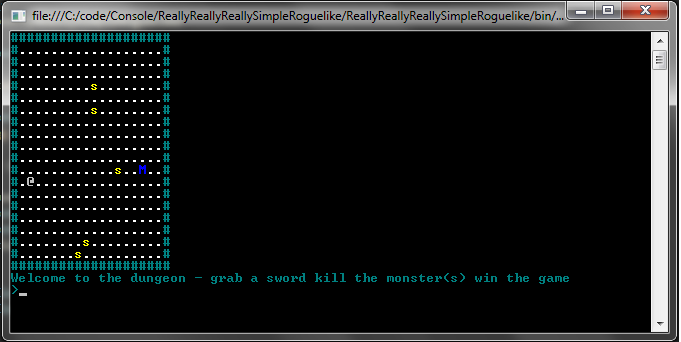
Screenshot of ReallyReallyReallySimpleRougueLike
Next Time
Next time I will present the first iteration of the program and we’ll see some nice improvements.
another question asked is do all roguelikes use ASCII graphics – no – have a look at this screenshot from one of the most popular TOMe 4 – see http://te4.org/ for details
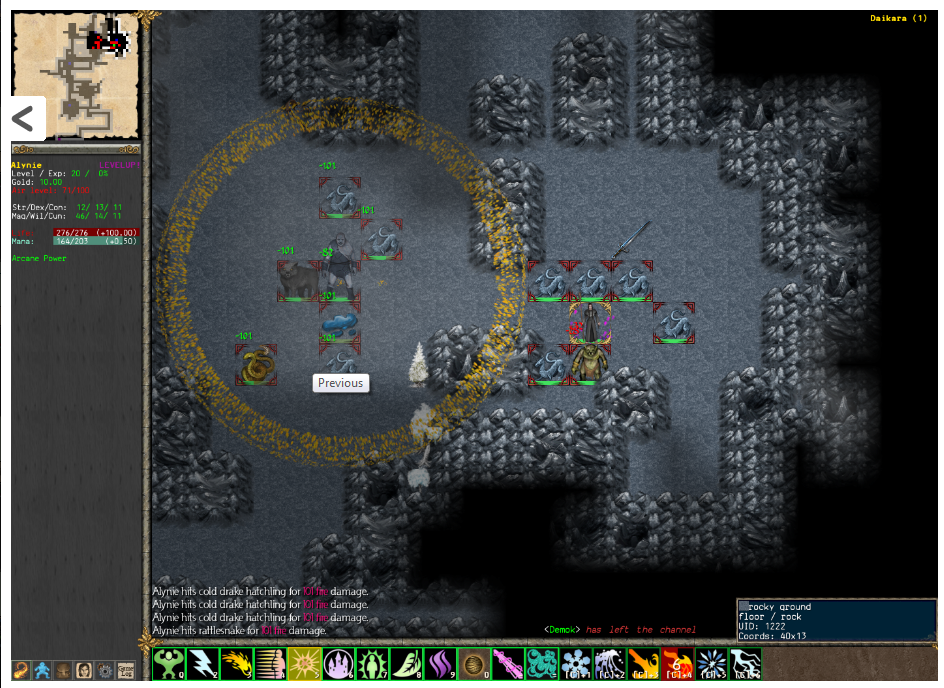
tome 4 screenshot
I have been asked this recently and like always Wikipedia is the best source of information:
“The roguelike is a sub-genre of role-playing video games, characterized by randomization for replayability, permanent death, and turn-based movement. Most roguelikes feature ASCII graphics, with newer ones increasingly offering tile-based graphics. Games are typically dungeon crawls, with many monsters, items, and environmental features. Computer roguelikes usually employ the majority of the keyboard to facilitate interaction with items and the environment. The name of the genre comes from the 1980 game Rogue.”
Wikipedia 2012
A couple of other things I add:
-Derived from the Dungeons and Dragons role playing game
-Emphasis on “hack and slash” combat
-Single player
-Experience points are commonly used
-Fantasy genre is commonly used
Dom
Its interesting that ASCII games could have such a high level of interest at the moment and there was a really interesting 10-15 minutes on the subject in a recent podcast I listened to – the podcast was actually about a game called “100 rogues” but from about 40 min into the podcast the guys at ROGUELIKE radio focus on the reasons why the roguelike genre is getting so popular. Its a great listen so if you have a chance…
http://roguelikeradio.blogspot.com/search?updated-max=2011-10-23T12:50:00-07:00&max-results=7
Dom
Ok I am building a really really really simple Roguelike in C# to show how easy it is to do and also to show how C# is such a cool language to build RogueLikes. More details soon but here is a a really exciting screenshot…
Screenshot of ReallyReallyReallySimpleRougueLike
We are going to see a lot more articles and tutorials from me on roguelike games this year and part of the reason for this is the importance for these type of games for the beginner/intermediate developer. Whilst it’s obviously hard to build any sort of 3d game for a beginner developerwithout assistance – building a simple yet playable roguelike game however (even just using a windows console app say using C#) is quite possible. OK you are not going to make a fortune out of a simple textbased rouguelike ,but you may well be able to get your friends to play it!!!
Some cool links for roguelikes:
http://roguelikeradio.blogspot.com/
http://roguelikedeveloper.blogspot.com/
http://blogs.msdn.com/b/ericlippert/archive/2011/12/12/shadowcasting-in-c-part-one.aspx
Dom
 Doms Code